
What is a VPN? Meaning, Benefits, and How to Get One
As our digital footprint gets bigger, it’s clear that our lives are intertwined with the internet. Now, more than ever, online security is critical. Every time we browse the web, we leave digital footprints that can be tracked, monitored, and exploited by anyone from hackers and advertisers to government agencies. Yikes! This is where a VPN, or Virtual Private Network, emerges as a crucial tool for anyone who values their online privacy and security.
At its core, a VPN is a technology that creates a secure, encrypted connection between your device and the internet. When you connect to a VPN server, your internet traffic is routed through an encrypted tunnel, making it virtually impossible for anyone to intercept or decipher your data. This means that your online activities, including the sites you visit, your passwords, and personal information, remain hidden from prying eyes.
But the upside extends far beyond just keeping your data secure. VPNs can help you get around geographical restrictions, allowing you to access content that may be blocked in your region.
Some providers also offer the option to use a static IP address, which can be beneficial for secure remote access or hosting servers. They can also protect you when using public Wi-Fi networks, which are often unsecured and vulnerable to attacks.
By encrypting your internet connection, a VPN ensures that your online activities remain private and secure, even when using shared networks.
As we explore the world of VPNs, we’ll get into the different types available, explain how they work, and highlight the key features to look for when choosing a VPN provider. We’ll cover all the ways VPNs can help you safeguard your digital life in an increasingly connected world.
So, whether you’re a privacy-conscious individual, a frequent traveler, or simply someone who wants to protect their online activities, understanding the power of VPNs is essential.
A VPN is one of the most secure ways to connect to the Internet while maintaining complete privacy.
There are three ways WhatIsMyIPAddress.com can help you:
- We can make it easy for you to CHOOSE the right one within just a few minutes by heading over to our VPN Simplifier.
There are hundreds of Virtual Private Networks to choose from, which often makes choosing the best VPN for privacy time-consuming and confusing.
You need privacy and you need it now. So, at WhatIsMyIPAddress.com, we came up with a way to make the process simple for you.
We created VPN Simplifier™
Tell us what you’d like most from a VPN—greater privacy, extra security or unrestricted access—and we’ll recommend, based on our research, the best one for that criterion and ultimately, you.
And because nearly all VPNs offer free trial periods and money-back guarantees, trying one is virtually risk-free.
- If you want to go to a list of the best VPNs where you can compare VPN features side-by-side, visit our VPN Service Comparison.
- If you want more of an explanation about VPN basics, just read on.
Understanding the Basics: What is a VPN?
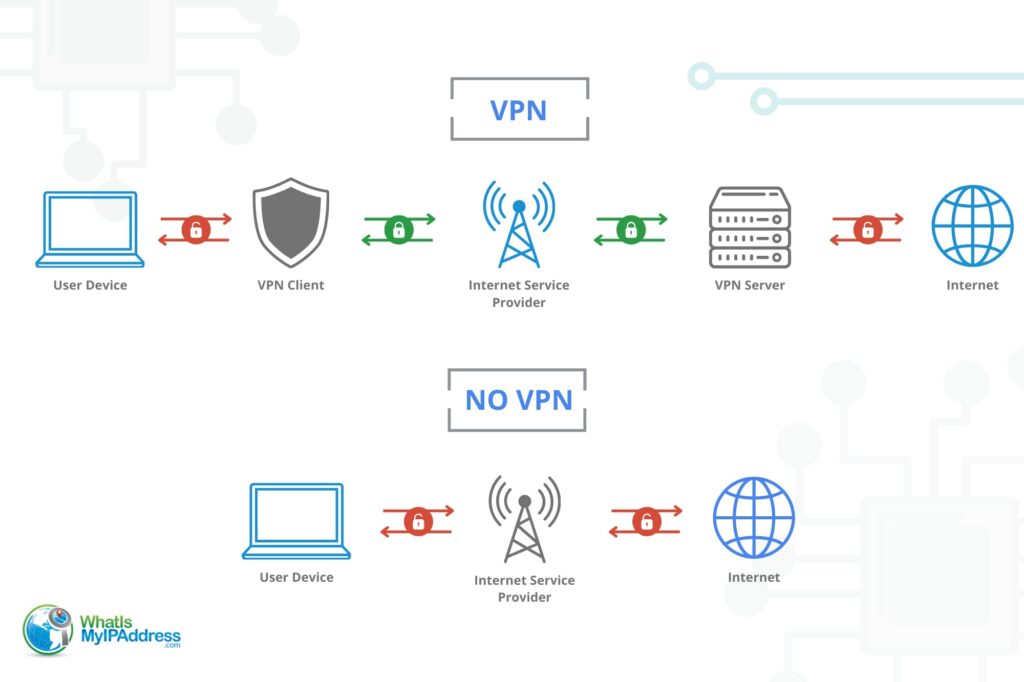
Before we get into the details about how a VPN works, let’s start with the fundamentals. VPN stands for Virtual Private Network, a technology that creates a secure, encrypted connection between your device and the internet.
In essence, a VPN establishes a private network within a public one, allowing you to send and receive data securely, even when using public Wi-Fi or other untrusted networks.
| Protocol | Speed | Security | Stability | Open Source | Best For |
|---|---|---|---|---|---|
| WireGuard | Very fast | Strong (ChaCha20) | Good | Yes | General use, speed |
| OpenVPN | Moderate | Very strong (AES-256) | Excellent | Yes | Maximum security |
| IKEv2/IPSec | Fast | Strong | Excellent on mobile | Partial | Mobile devices |
| L2TP/IPSec | Moderate | Moderate | Good | No | Legacy systems |
When you connect, your device establishes a secure connection with a remote server operated by the VPN provider. This connection is often referred to as a “tunnel” because it creates a private, encrypted pathway for your data to travel through.
Once your data reaches the VPN server, it is then sent out to the internet, masking your original IP address and location.
The encryption process is a critical component of how a VPN works. When your data is encrypted, it is transformed into a coded format that is unreadable to anyone who intercepts it.
This means that even if a hacker manages to get their hands on your data, they won’t be able to decipher it without the encryption key.
The level of encryption used by VPNs varies, but the most common and secure standard is AES (Advanced Encryption Standard) with 256-bit keys.
| Parameter | Remote Access VPNs | Site-to-Site VPNs | Mobile VPNs |
|---|---|---|---|
| Type of Connection | User connects to a private network | Private network connects to another private network | User connects to a private network |
| Software Requirement | Software installed on both a private device and the private network | Software on both networks; users do not need apps | App download to mobile device |
| Use Cases | Connecting to a private network from home or another remote location | Creating a secure tunnel between two private networks | Access the internet securely via public wi-fi or cellular network |
Different Types of VPN Connections
VPNs come in various forms, each designed to meet specific needs. The three main types of VPN connections are Remote Access VPNs, Site-to-Site VPNs, and Mobile VPNs.
1. Remote Access VPNs
Remote Access VPNs are the most common type of VPN connection and are primarily used by individual users who want to securely access a private network from a remote location.
This type of VPN allows employees to connect to their company’s network from home, a coffee shop, or any other location with internet access. Remote Access VPNs are also popular among consumers who want to protect their online privacy and security when using public Wi-Fi networks.
When using a Remote Access VPN, the user’s device establishes a secure, encrypted connection with the VPN server, which then acts as a gateway to the private network. This allows the user to access resources and services on the private network as if they were directly connected to it.
2. Site-to-Site VPNs
Site-to-Site VPNs, also known as Router-to-Router VPNs, are used to connect two or more networks together over the internet. This type is commonly used by businesses with several locations, allowing them to securely share resources between offices.
In a Site-to-Site VPN setup, the VPN connection is established between two or more routers, creating a secure tunnel for data to flow between the connected networks. This makes it so that employees in different locations to access shared resources, such as file servers, databases, and applications as if they were on the same local network.
3. Mobile VPNs
Mobile VPNs are designed specifically for mobile devices, such as smartphones and tablets. These allow users to maintain a secure, encrypted connection while moving between cellular data networks to Wi-Fi networks.
Mobile VPNs are particularly useful for people who need to access sensitive information on the go, as they secure connections when switching between networks. They also help to protect users’ privacy and security when using public Wi-Fi networks, which are often unsecured and vulnerable to attacks.
In addition to these three main types of VPNs, there are also other variations, such as SSL VPNs (Secure Sockets Layer VPNs) and Hybrid VPNs, which combine features of Remote Access and Site-to-Site VPNs.
What Do You Want From a VPN?
Based on our own survey, we discovered that people want a VPN for three primary reasons. (As you read this, ask yourself what is it that you want.)
MORE PRIVACY. Millions of us want to keep the government and Internet providers from “spying” on them, and they also want to keep advertisers from tracking their online activity.
EXTRA SECURITY. A lot of us are worried about hackers or other snoops intercepting our internet traffic from a network, especially when using free Wi-Fi—an unsecured hot spot network.
GREATER ACCESS. Have you ever been blacked out of Netflix or a sporting event (a soccer game, for example) because of your geographical location? Many people want to avoid those blocks.
A VPN can help with all of these. But there are other reasons, a little more specialized. Here are a few.
- It can help you get around censorship in some countries. In a few regions, people worry that it’s illegal to use a vpn, so it’s important to understand local VPN restrictions before using one to access blocked content.
- It can help you get around internet filters at work or school
- It makes streaming/downloading movies easier and safer.
I know what you might be thinking about now. “Do I really need VPN?” Well, the answer to should be a resounding “yes.” That’s the prevailing opinion of most security professionals.
Why You Need a VPN
Internet privacy and experts all agree that we should be using a VPN as often as we can. They cite the following main reasons.
UNSECURED NETWORKS. When you’re using free Wi-Fi—at malls, coffee shops or hotels for example—anyone can jump on the network. If there’s a skilled prankster nearby, you could be tricked into connecting on to his network or he could see your internet activity.
GOVERNMENT SPYING. It’s on the increase. Often it’s not “spying,” but falls under “monitoring” citizens’ internet activity for threats. But it just sounds like spying.
ISP MONITORING. Internet providers track their customer’s internet traffic and even sell it to businesses and advertisers. Your privacy is under attack.
You should even think about using a VPN at home. While you might feel safe at home or work, where you generally have a secure connection, there is likely someone monitoring your internet activity and collecting a profile on your internet habits. In fact, it’s almost certain that someone is doing that now. Even if they can’t identify you by name, is that what you want?
You might be wondering how a VPN can make a difference, and if using one really can do all that your reading about. The answer is YES! VPNs can help you control your internet experience!
Choosing the Right Provider: Key Factors to Consider
When evaluating VPN providers, consider the following factors:
- Security: Look for VPNs that offer strong encryption protocols, such as AES-256, and secure tunneling protocols like OpenVPN, IKEv2/IPSec, or WireGuard. Additionally, features like a kill switch, which disconnects you from the internet if the VPN connection drops, and DNS leak protection are essential for maintaining your privacy.
- Speed: VPNs can sometimes slow down your internet connection due to the encryption process. Choose a provider that’s going to offer you fast connection speeds with a wide network of servers to minimize latency and ensure smooth browsing, streaming, and downloading experiences.
- Server Locations: If you need to access geo-restricted content or want to bypass censorship, look for a VPN provider with servers in the locations you require. A wide network of servers also helps distribute the load, resulting in better speeds and reliability.
- Price: VPN pricing varies greatly, with some providers offering free plans and others charging monthly or annual fees. While free VPNs may be tempting, they often come with limitations such as slower speeds, fewer server locations, and less robust security features. Paid VPNs generally offer better performance, security, and customer support.
One important factor to consider when deciding on a VPN provider is their logging policy. A no-log VPN provider does not keep any records of your online activities, ensuring that your privacy is protected even if the provider is compelled to share information with authorities.
Always read the provider’s privacy policy carefully to understand what data they collect and how they handle it.
Should You Choose a Free VPN?
Free VPNs may seem attractive, but they often come with several drawbacks. Some free providers may sell your data to third parties for advertising purposes or limit your bandwidth and connection speeds.
They may also have fewer server locations and weaker security features compared to paid VPNs. On the other hand, paid VPNs typically offer better performance, more advanced security features, and dedicated customer support.
When selecting a VPN provider, you really need to do your research and read reviews from trusted sources. Look for providers that have a proven track record of protecting their users’ privacy and security, and remember the old saying, if it seems too good to be true, it is!
VPN Limitations and Considerations
While VPNs offer some serious benefits, be aware of some limitations and considerations when using these services.
- Internet Speed: VPNs can potentially slow down your internet connection due to the encryption process and the distance your data travels through the VPN server. However, this impact on speed can be minimized by choosing a reputable provider with fast servers and optimized infrastructure.
- Compatibility: Some online services, particularly streaming platforms like Netflix and Hulu, may block VPN traffic to enforce geographical restrictions on their content. While many VPN providers offer dedicated servers for streaming, it’s important to check if your preferred VPN is compatible with the services you wish to use.
- Legal Considerations: While using a VPN is legal in most countries, some governments may restrict or ban VPN use. You definitely need to get a handle on the legal status of VPNs in your country and any countries you plan to visit, especially if you intend to use a VPN to bypass censorship or access geo-restricted content.
Choosing the right VPN server
Your device will automatically connect to a server that is close to your location, but you may choose to find servers that are better suited for activities such as gaming or streaming.
You may even opt to use a server from a different country to avoid blocks and censorship imposed by that country and access region-locked sites across the world.
Choosing the Right VPN Server
Your device will automatically connect to a server that is close to your location, but you may choose to find servers that are better suited for activities such as gaming or streaming. You may even opt to use a server from a different country to avoid blocks and censorship imposed by that country and access region-locked sites across the world.
Bypass content restrictions, streaming service blocks, and government censorship with a VPN.
Which VPN is the Best?
The pros at WhatIsMyIPAddress have reviewed dozens of VPNs and shortlisted some of the best providers.
1. CyberGhost
With a monthly subscription fee of less than $12 and a 45-day money-back guarantee, CyberGhost gives users strong budget-friendly VPN protection at just $1.59/month on the 2-year plan.
- Servers in 100+ countries
- Allows seven connected devices
- WireGuard, OpenVPN, and IKEv2 protocol support
- 45-day risk-free trial (14-day guarantee on the monthly plan)
- Antivirus and other upgrades available to enhance security
- Available for all operating systems
2. Express VPN
ExpressVPN now offers three tiers: Basic, Advanced, and Express Pro, giving users the choice between core VPN protection and a broader privacy suite.
- Basic: $2.49/month (2-year plan). Best-in-class VPN, 10 simultaneous devices
- Advanced: $2.99/month (2-year plan). Adds Advanced Protection (ad, tracker, malicious site, and adult site blocking) and unlimited password manager
- Express Pro: $5.49/month (2-year plan). Adds dedicated IP and unlimited eSIM data, 14 simultaneous devices
- 256-bit AES encryption
- Servers in 105 countries
3. NordVPN
With three plans to choose from, Basic, Complete, and Prime, NordVPN is a versatile and affordable VPN option starting at $3.49/month on the 2-year plan.
- Plans start at just over $3 per month
- Malware protection included in all packages
- 30-day risk-free trial
- “Always on” threat protection
- Available for all operating systems and devices
- Flexible privacy settings
- Ad blocker included

4. Surfshark
Surfshark is a very affordable VPN option with unlimited device connections on every plan. With plans starting at $2.49/month (2-year plan), Surfshark offers:
- Unlimited devices
- Ad and malware blocker
- Two-factor authentication
- 24/7 support
- Two months free
- One and One+ tiers add antivirus, breach alerts, private search, and Incogni data removal

How Much Does a VPN Cost?
While there are free VPN providers, they may not offer the same features, speed, and privacy as paid subscriptions. There are a few factors that may impact subscription prices, such as:
- Data limits
- Streaming capabilities
- Number of devices covered
- Number of available servers
- Length of contract
The average cost of a VPN per month is just under $10, but providers will offer heavy discounts for annual subscriptions. You may be able to save up to 70% with a longer-term agreement, bringing your monthly price down to $2 per month for some providers. A two-year contract costs an average of $3.40 per month.
| Feature | Free VPN (Typical) | Paid VPN (Typical) |
|---|---|---|
| Monthly Cost | $0 | $1.59 to $16.45/month |
| Data Limit | 500MB to 10GB/month | Unlimited |
| Server Locations | 3 to 10 countries | 100+ countries |
| Speed | Throttled during peak hours | Optimized, minimal throttling |
| Logging Policy | May log and sell browsing data | No-log (independently audited) |
| Encryption | Varies (some use weaker encryption) | AES-256 standard |
| Customer Support | Email only or none | 24/7 live chat |
Data last verified: July 10, 2026. We update this information quarterly.
VPN providers may also offer packages and upgrades, such as ad blockers and antivirus, for a small increase in price. If you’re looking for a complete security toolkit, these upgrades will help you patch up existing holes in your current antivirus protections.
What A VPN Can’t Do
VPNs will block your information from online spies and public wifi threats. It encrypts data so that, even if your information is hacked, it cannot be used by bad actors. It’s important to note that even though a VPN will protect your browsing and internet history, it will not protect against a user’s risky behaviors.
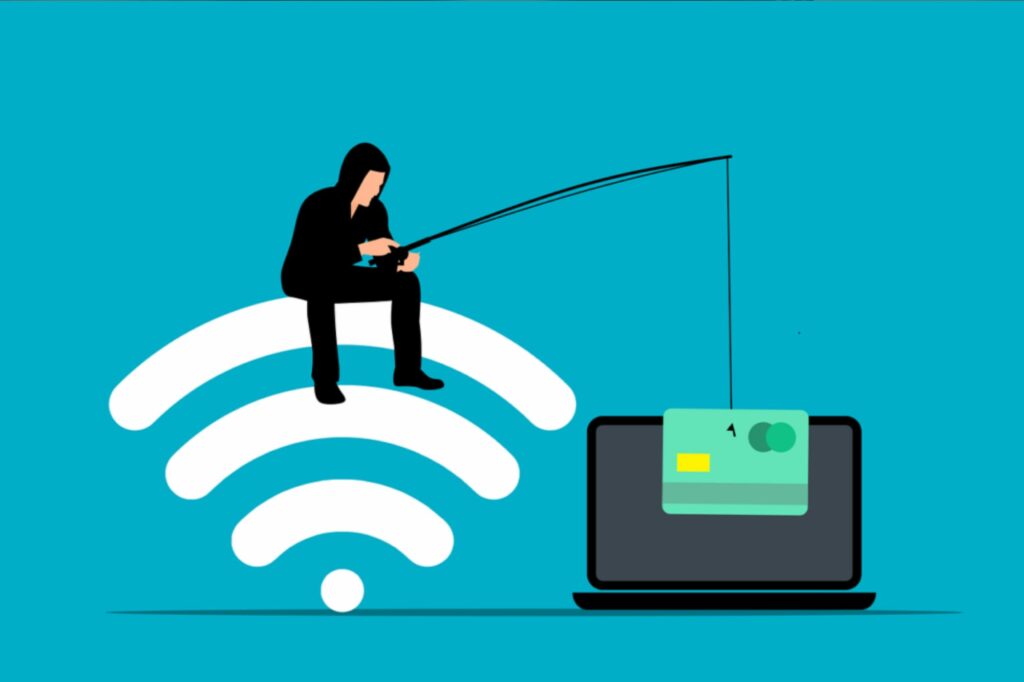
You will still be at risk for a breach if you install suspicious files, open spam and phishing emails, and don’t follow strong password creation strategies.
That’s why a VPN is only one layer, although an important one, of a comprehensive cybersecurity strategy. Practicing safe online behaviors and a good antivirus will help patch the holes in your security.
Zero trust
Never click a link in a text or email, even if it is allegedly from your bank or a government agency. Go directly to the official website and seek your notifications there.
No suspicious downloads
If you’ve received a document via email or text and were not expecting one, never download it onto your computer. This includes orders you never authorized, financial documents, and other documents labeled “urgent.” As above, go directly to the official website and look for the download there.
Beware the social media DMs
Never open any link shared via social media messenger until you have contacted the sender and verified the link. These are usually malicious links and, as discussed earlier, sent from cloned or fraudulent accounts.
Recognize spam
Spam emails and texts are pretty easy to recognize once you identify common mistakes hackers make.
- English is nonsensical: Hackers will not follow proper grammar and spelling. This is a dead giveaway that the message is malicious.
- Unusual fonts: Hackers will frequently use unusual, unprofessional-looking fonts in the subject line.
- Threatening: Messages sent by bad actors will frequently appear threatening, hoping to frighten the recipient into action. These include the “restricted account” and “unusual activity” messages from financial institutions.
- Unexpected: You will expect receipts and communications from sites you’ve made purchases from, but never trust a message about a purchase you didn’t authorize. Go to the vendor’s website and check your order history; never click on these links.
- Company name misspelling: Look for variations and misspellings of the alleged company name. These can be very subtle, such as “AmaZon.”
- The sender doesn’t match the organization: Hover over the sender to check that the address is from the company it claims to represent.
- Your name is misspelled: Your name may be misspelled in the subject line or elsewhere in the message.
- Your name is not used at all: Organizations will address you by the name they have on file for you. Never trust a message addressed to “valued customer” or other generic references.
Remember, whether you’re browsing the web, streaming content, or working remotely, a VPN can provide an extra layer of security and peace of mind in your everyday online activities. So, take control of your digital presence, and enjoy the benefits of a safer, more secure online experience.
Not sure how to choose the right VPN for you? Try our VPN Simplifier.
Frequently Asked Questions
Are there any dangers in using a VPN?
Yes, there are dangers in using a VPN. These include IP logging, jurisdiction issues, traffic restrictions, potential malware that can spy on your activities and steal personal information, exposure to network threats like DDoS and spoofing attacks, incomplete anonymity, dependence on the VPN service’s privacy policies, legal issues in some countries, and the cost of reliable VPN services.
Can you use a VPN on a smart TV?
Contrary to common belief, a VPN can indeed work with a smart TV. However, most smart TVs do not have native VPN support.
To use a VPN with your smart TV, you’ll typically need to configure the VPN on your router or create a protected Wi-Fi hotspot through your computer. This allows your smart TV to access the internet through a VPN-secured connection.
Does a VPN change your IP?
A VPN can change your IP address by masking your original IP and assigning you a new one from a server in a location of your choice. This switch makes it appear as if your internet requests are originating from the VPN server’s location.
Beyond altering your IP, a VPN also conceals your location, identity, and online activities. To change your IP address using a VPN, simply open your VPN application and select the server location you wish to connect through. This process reroutes your internet traffic through the chosen server, effectively changing your IP address.
Does a VPN drain the battery?
Yes, a VPN does drain the battery of your smartphone or laptop. This is because VPNs require power to perform encryption and decryption processes whenever you use the internet.
Is Wi-Fi slower with VPN?
Using a VPN can slow down your internet connection significantly. Research indicates that Wi-Fi speeds can decrease by up to 77% once connected to a VPN. However, opting for a high-quality, subscription-based VPN can help maintain reliable internet speeds despite the encryption and routing processes involved.
Should VPN be on or off?
In most situations, it’s recommended to keep your VPN switched on to protect against snoopers and hackers. This is especially crucial when sharing sensitive information or conducting financial transactions over public Wi-Fi networks.
What actually happens when you use a VPN?
A VPN encrypts your internet traffic and directs it through a server provided by your service before accessing websites or online services. This process enhances anonymity and privacy online by masking your identity and activities.
What are the cons of using a VPN?
Using a VPN has drawbacks to consider, including slower connection speeds due to encryption, potential visibility of your data by the provider, subscription costs, susceptibility to being blocked, connectivity issues, legal restrictions in some countries, and risks associated with choosing an unreliable provider.
What does a VPN not hide?
A VPN hides your IP address and encrypts your internet traffic to protect your online activities from hackers and ISPs. However, it doesn’t hide your browsing history, user account details, data usage, or information you voluntarily share online. So, while a VPN boosts security and anonymity, it doesn’t cover all aspects of your digital footprint.
What does VPN protect you from?
A VPN shields your online activities from external access and interception by disguising your data traffic and concealing your IP address. It encrypts your information, rendering it unreadable to interceptors.
Whether you’re traveling and need secure access to your business or home network, or you want to keep your browsing private from your local network and ISP, a VPN provides a secure solution.
What is a VPN used for?
A Virtual Private Network (VPN) is a service that securely connects your device to another network over the internet. It hides your IP address, encrypts your online activities, and enables access to region-restricted websites. They protect sensitive information like passwords and browsing history from potential eavesdropping on public Wi-Fi networks, ensuring privacy and security online.
What is the purpose of using VPN?
A VPN, or virtual private network, is a versatile tool that serves several important purposes. It encrypts your internet connection to keep your data secure.
This allows you to stream content from anywhere and access websites that might be blocked in your region. It also helps bypass censorship, prevents your ISP from tracking your online activities, and can even protect against price discrimination online.
What is the VPN and how it works?
A VPN, or virtual private network, creates a private network from a public internet connection, encrypting your data to protect your privacy. It hides your IP address and online activity from others by routing your connection through a remote server operated by the provider. This process ensures your online activities remain secure and private.
Who has the fastest VPN?
NordVPN with the WireGuard protocol currently holds the title of the fastest VPN, as per recent tests measuring download and connection speeds conducted in 2023. This combination of VPN protocol and provider has shown superior performance in speed tests, making it a top choice for users prioritizing fast and reliable internet connections.